
If you are able to download the file, but not run it, make sure you are on a Windows computer.
Select your internet browser: Google Chrome | Firefox | Internet Explorer | Other
Google Chrome
Step One:
Go to the Home Page to download the game.
Step Two:
Click “Keep” when prompted.

Step Three:
Click the file to begin.

Step Four:
Allow the program to run.
If you plan on playing a lot, uncheck “Always ask before opening this file”.

FireFox
Step One:
Go to the Home Page to download the game.
Step Two:
Click “Save” when prompted.

Step Three:
Click the file to begin.

Step Four:
Allow the program to run.
If you plan on playing a lot, uncheck “Always ask before opening this file”.

Internet Explorer
Step One:
Go to the Home Page to download the game.
Step Two:
If you plan on playing this only once, or very rarely, click “Run” when prompted.
If you plan on playing this multiple times, click “Save” when prompted.

Step Three:
If you selected “Run” in step two, click “Actions” when prompted.

Then, click “More Options”.
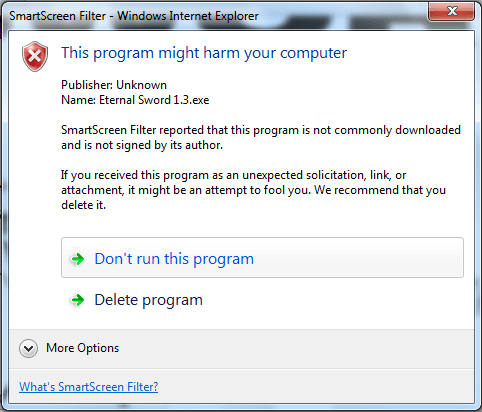 .
.
You will then see “Run Anyway”. Click this option.

Done!
If you selected “Actions” in step two, click “Actions” when prompted.
You will then see “Run Anyway”. Click this option.
Done!
Other
If you do not have any of the previous mentioned browsers, yours should at least be something like one of them.
If you require further help, drop us a line at teameternal582@gmail.com and we will responed as soon as possible.
 Eternal Sword